 Back
Back
Liquidity Management System (LMS) enables you to view the changes in computation and accounting of bank interest and apportionment occurred due to a particular change made in an agreement.
 The
The  icon indicates
the presence of a list containing the relevant information. You can choose
to type the value or type % to view the list.
icon indicates
the presence of a list containing the relevant information. You can choose
to type the value or type % to view the list.
1. Navigate to Liquidity.
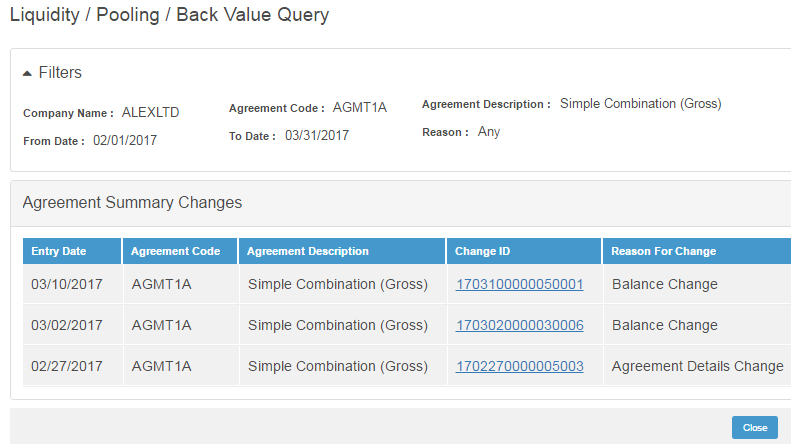
2. Click Pooling >> Back Value Query. The Back Value Query page is displayed.
3. Specify the following in Filters section:
• Company Name
• Agreement Code
• From Date
• To Date
• Reason, the available options are:
– Any
– Agreement Details Change
– Edit Interest Profile
– Balance Change
4. Click Search. The grid displays the following Agreement Summary Changes details:
– Entry Date
– Agreement Code (as specified in the query)
– Agreement Description
– Change ID (generated for each back value change for an agreement)
– Reason for Change
5. Click Change ID link to view the details of the changes. You can view the details under the following sections:
– Bank Interest Accrued
– Bank Interest Settled
– Apportionment
• You can view the calculation of changes per node over the period of change. Click the Detail View to view the details.
| © 2017-19 Finastra International
Limited, or a member of the Finastra group of companies (“Finastra”).
All Rights Reserved.
Cat ID: FCM4.6-00-U02-1.5.3-201903 |