 Back
Back
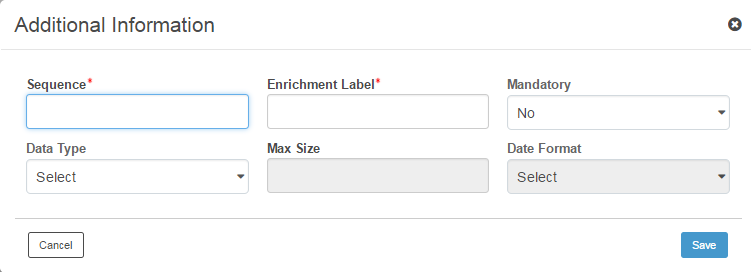
You can define field labels for any additional information that can be captured while creating a forecast transaction.
1. Click Add Additional Information. The Additional Information popup is displayed.
2. Specify the following details:
• Sequence: Specify the number to set the sequence of an enrichment label.
• Enrichment Label: Specify the enrichment label to make it available in the transaction details page.
• Mandatory: Select Yes from the drop-down list to designate the corresponding enrichment label as mandatory.
• Data Type: Select the required data type. The available options are:
– Text
– Amount
– Date
– Number
• Maximum Size: This field is applicable for Text and Number Data Type.
• Date Format: This field is applicable for Date is selected for the Data Type. Select the required date format. The available options are MM/dd/yyyy and dd/MM/yyyy.
3. Click Save to navigate to the additional information page.
4. You can Verify and Submit the package after specifying all required additional information definitions.
 Approval is required for all new or edited
master setups.
Approval is required for all new or edited
master setups.
 Where to go from here
 Verifying
and submitting a forecast package
Verifying
and submitting a forecast package
| © 2017-19 Finastra International
Limited, or a member of the Finastra group of companies (“Finastra”).
All Rights Reserved.
Cat ID: FCM4.6-00-U02-1.5.3-201903 |