 Back
Back
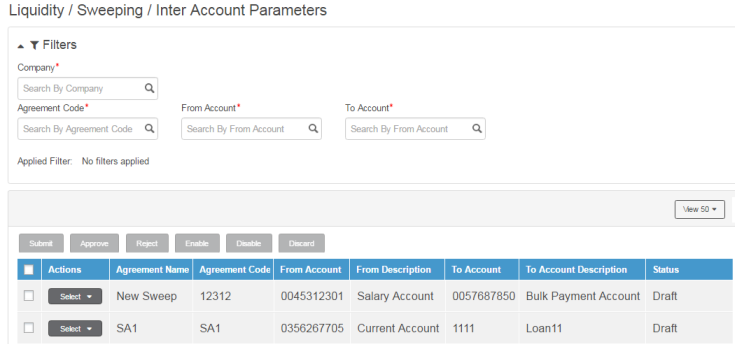
As part of inter-account parameters, Fusion Cash Management allows you to specify lending and/or borrowing rate for an agreement from the Participating account perspective. The rates can be fixed or variable and may vary based on the amount slabs. Based on the rates captured, the daily inter account position is maintained for the agreements that are scheduled for execution
1. Navigate to Liquidity.
2. Click Sweeping >> Inter Account Parameters. The Inter Account Parameters page displays the list of account pairs for each agreements. These records are created once the agreement is approved if the Manage inter account position is selected for the agreements.
3. Click the  icon to customize the columns and column order. For more information,
see Customizing summary
information.
icon to customize the columns and column order. For more information,
see Customizing summary
information.
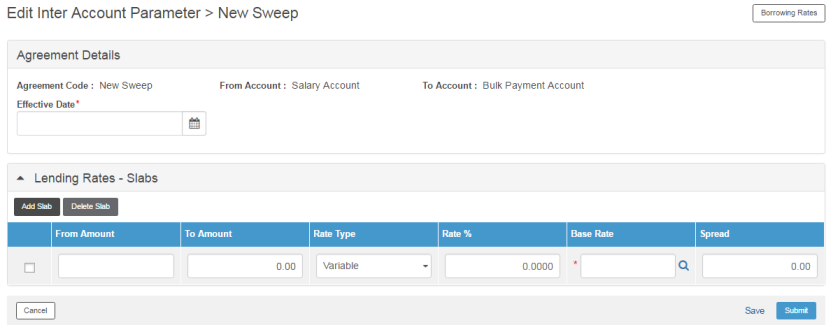
1. From the Select dropdown click Edit Record for an agreement. The Edit Inter Account Parameter page is displayed.
2. Specify following details in the Agreement Details section:
• Agreement Code: This field is auto-displayed.
• From Account: This field is auto-displayed.
• To Account: This field is auto-displayed.
• Effective Date: Specify the date from which agreement tracking begins.
3. Specify the slabs for lending rates and borrowing rates for the participating account in the sweep transaction.
 By default lending rates details are
displayed, click Borrowing Rates
button on the right corner of the page to specify the slabs for borrowing
rate.
By default lending rates details are
displayed, click Borrowing Rates
button on the right corner of the page to specify the slabs for borrowing
rate.
4. Click Add Slab from Lending Rates - Slabs or Borrowing Rates - Slabs section to add a new slab.
5. Specify the following details in grid:
• From Account: Specify the account from which fund is to be transferred.
• To Account: Specify the account to which fund is to be received.
• Rate Type: Select the rate type. You can select from Fixed or Variable options.
– If you choose rate type as Fixed, specify the applicable rate of interest in Rate % column.
– If you select rate type as Variable, specify the Base Rate and applicable percentage of Spread.
6. Click Submit to submit the slab definition.
· To save the slab definition and specify another slab details, click Save.
· To navigate back to Inter Account Parameters page, click Cancel.
· To delete a slab click Delete Slab.
| © 2017-19 Finastra International
Limited, or a member of the Finastra group of companies (“Finastra”).
All Rights Reserved.
Cat ID: FCM4.6-00-U02-1.5.3-201903 |