 Back
Back
Fusion Cash Management (FCM) enables you to define and customize the nature and content of the forecast package used for forecasting cash flows, based on the client requirements. FCM also enables you to configure user rights on the forecast package.
FCM allows you to set the default values for the forecast package fields. The values for the forecast package are available in the Create forecast transaction page.
1. Navigate to Cashflow Forecast.
2. Click Forecast Package. The Forecast Package List is displayed.
 You
can filter your search by different statuses.
You
can filter your search by different statuses.
3. Click Create Forecast Package.
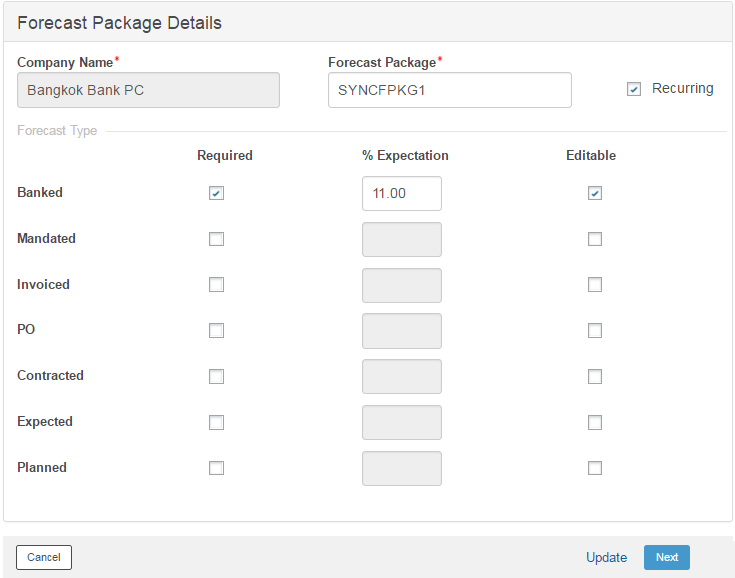
4. Specify the following package details:
• Company Name: Search and select the Company Name for which the package is being created. Applicable if you are mulit-subsidiary user.
• Forecast Package: Specify a name for the Forecast Package.
FCM does not support
special characters (“ \ ~ ^ and ‘) in this text field.
• Recurring: Select this check box to enable the package to support creating recurring forecast transactions. For example, payment of monthly rentals or subscriptions.
• Forecast Type: Classify the funds based on the following forecast types:
– Banked: Transactions which are already deposited with financial institution.
– Mandated: Amount for which mandate is received or given.
– Invoiced: Amount for which Invoice is already raised.
– PO: Amount for which Purchase Order (PO) is already raised.
– Contracted: Amount which is to be received as per contract between two parties.
– Expected: Amount for which receipt is expected but there is no surety if it is received.
– Planned: Amount for which receipt or payment is planned.
• Required: Select the Required check box to enable user to select the allowed forecast type/s in the package.
• % Expectation: Specify the expected percentage of a particular forecast type that can be used to calculate the forecast. The percentage can also be allowed for editing while creating the forecast transaction, if required.
 A client has USD 1000 as dues to be
credited to the account of prospective sales but subject to negotiation
(max upto 5%). Out of the total credits, 95% of this amount is assured,
the client user can specify 95% in the expected percentage.
A client has USD 1000 as dues to be
credited to the account of prospective sales but subject to negotiation
(max upto 5%). Out of the total credits, 95% of this amount is assured,
the client user can specify 95% in the expected percentage.
• Editable: Select this check box if you want to edit % Expectation field while creating a forecast transaction.
5. Click Save and Next to specify additional information for forecast package.
 Where to go from here
 Specifying
additional information
Specifying
additional information
| © 2017-19 Finastra International
Limited, or a member of the Finastra group of companies (“Finastra”).
All Rights Reserved.
Cat ID: FCM4.6-00-U02-1.5.3-201903 |